Recent changes to wikihttps://sourceforge.net/p/redfish-lab/wiki/2020-10-19T13:00:20.368000ZRecent changes to wikiFirmwareUpdates-Part3-TheRedfishUpdateService modified by François Donzé2020-10-19T13:00:20.368000Z2020-10-19T13:00:20.368000ZFrançois Donzéhttps://sourceforge.net/u/fdonze/https://sourceforge.net258ea74a775db54fda78785250cf158aa9516f3a<div class="markdown_content"><p>TBD</p></div>Redfish wiki Home modified by François Donzé2020-10-19T12:49:28.686000Z2020-10-19T12:49:28.686000ZFrançois Donzéhttps://sourceforge.net/u/fdonze/https://sourceforge.net43b065fe44504765c0b959d4b301c0588bce4daf<div class="markdown_content"><pre>--- v34
+++ v35
@@ -42,7 +42,10 @@
.
* [how-to-change-the-factory-ilo-password]
This blog proposes a simple, quick and modern method to modify the factory randomly generated Administrator iLO password without knowing it.
-
+.
+* [FirmwareUpdates-Part3-TheRedfishUpdateService]
+This article describes the standard Redfish update service, including the simple update and the HPE OEM extensions actions.
+.
The wiki uses [Markdown](/p/redfish-lab/wiki/markdown_syntax/) syntax.
[[members limit=20]]
</pre>
</div>Storage-Management-with-Redfish modified by François Donzé2019-10-14T14:32:44.720000Z2019-10-14T14:32:44.720000ZFrançois Donzéhttps://sourceforge.net/u/fdonze/https://sourceforge.netac854c4fc6c686339b74c8cd6334e82abaddfa5d<div class="markdown_content"><pre>--- v3
+++ v4
@@ -18,13 +18,18 @@
The Redfish standard defines a `storage` subsystem as part of the `ComputerSystem` type under the `/redfish/v1/Systems/{item}/` location.
-However, HPE implements the description and the configuration of its Smart Storage devices (i.e. SmartArray controllers) respectively in the `SmartStorage` and `SmartStorageConfig` sub-trees of the same `ComputerSystem` type.
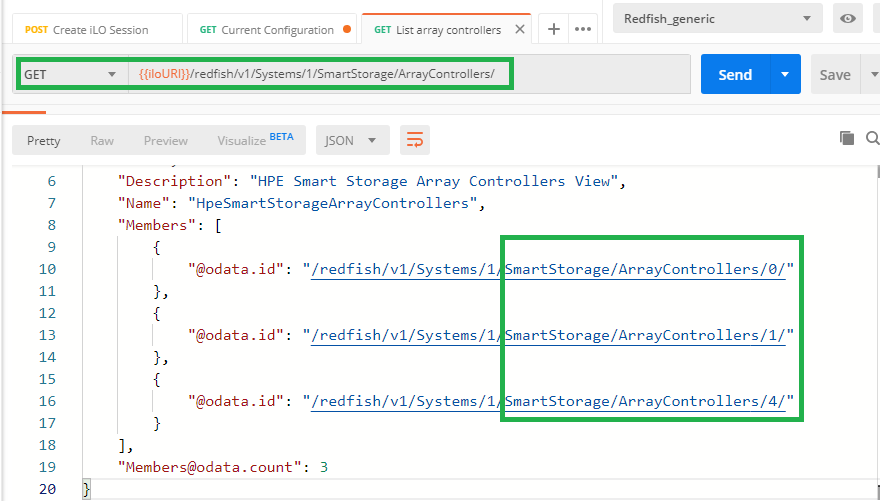
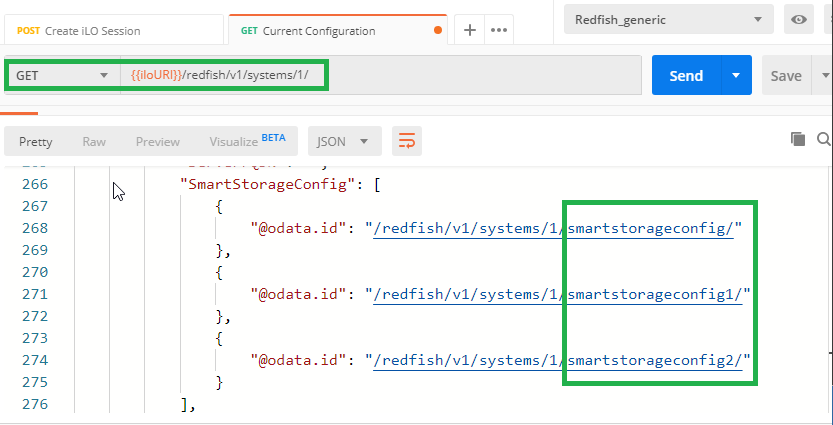
+However, HPE implements the description and the configuration of its Smart Storage devices (i.e. SmartArray controllers) respectively in the `SmartStorage` and `SmartStorageConfigX` (**X** is being an ID number) entry points of the same `ComputerSystem` type. When multiple controllers are present in a system,
+a `SmartStorage/ArrayControllers/{item}/` entry point is present for each controller description and a `SmartStorageConfigX` entry point exits for the configuration entry points. Note that `{item}` and **`X`** are not correlated.
-Since our infrastructure contains only HPE storage devices, only the `SmartStorage*` locations are populated. The following picture shows the URIs of four disk drives in our infrastructure. Their properties can be obtained with a simple `GET` request.
+
+
+
+
+Since our infrastructure contains only HPE storage devices, the `Storage` entry point is not populated. Only the `SmartStorage` and `SmartStorageConfigX` locations are populated. The following picture shows the URIs of four disk drives in the first controller of our infrastructure. Their properties can be obtained with a simple `GET` request.
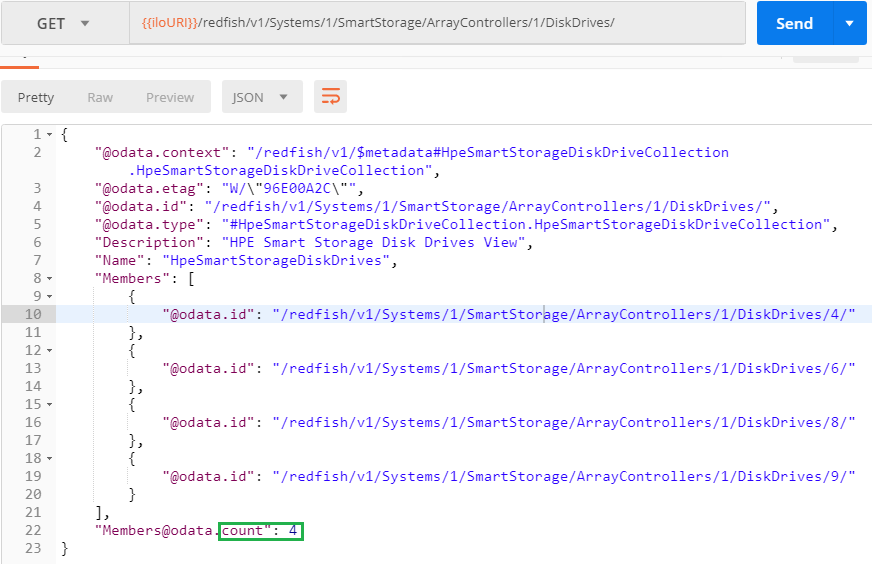
-If you only need the physical location of the disks to use for your logical drives, you can `GET` them from the `SmartStorageConfig` location as shown below.
+If you only need the physical location of the disks to use for your logical drives, you can `GET` them from the `SmartStorageConfig` location as shown below. Note that for the first controller found in the system, the **`X`** ID number is omitted.
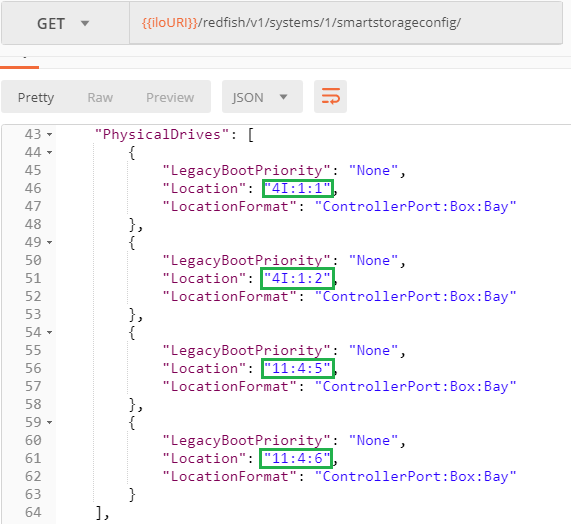
@@ -40,7 +45,7 @@
The management of HPE Smart Storage devices requires a proper understanding of the `DataGuard` property part of the `SmartStorageConfig` sub-tree. The value of this key "_indicates whether or not data destructive actions are allowed_" as explained in the [API Reference documentation](https://hewlettpackard.github.io/ilo-rest-api-docs/ilo5/#dataguard).
-This property is set in the pending settings (`SmartStoageConfig/Settings`) along with the directives to be performed by the Smart Storage device (i.e. Logical Volume Creation, Deletion...). During the next POST, the firmware checks its value and performs or not the requested directives.
+This property is set in the pending settings (`SmartStorageConfig/Settings`) along with the directives to be performed by the Smart Storage device (i.e. Logical Volume Creation, Deletion...). During the next POST, the firmware checks its value and performs or not the requested directives.
If the value is `Strict`, which is the default value when not changed in the pending settings, the firmware denies any destructive data action (create/delete logical drives or clear drive metadata....).
@@ -177,3 +182,5 @@
## Conclusion
The ability of managing HPE Smart Storage with Redfish is a major step forward to the full control of Gen10 servers with a single RESTful API.
+
+### Document last update: October 2019
</pre>
</div>EventSubscription modified by François Donzé2019-10-11T14:39:31.506000Z2019-10-11T14:39:31.506000ZFrançois Donzéhttps://sourceforge.net/u/fdonze/https://sourceforge.net43f6ac3b12224e6a47c80bc1e00e5a62c16206b7<div class="markdown_content"><pre>--- v30
+++ v31
@@ -1,44 +1,47 @@
-The Redfish Event Subscription Service
-================================
+# The Redfish Event Subscription Service
-Traps versus event subscriptions
----------------------------------
+## Scope of this article
-The Simple Network Management Protocol (SNMP) uses a “trap” mechanism to report asynchronous events generated by managed nodes toward pre-configured management consoles. All events are sent on the network and then processed by the management consoles. This approach may saturate the network and/or the management console in case of a storm of unsolicited events.
+This article describes the Redfish Event Subscription service implemented in HPE iLO 5 with a firmware version of 1.40 or later. The implementation of this service in iLO 4 may differ slightly.
+
+The Event Receiver program presented in this blog is an alternative to the DMTF [Redfish-Event-Listener tool](https://github.com/DMTF/Redfish-Event-Listener).
+
+## Traps versus event subscriptions
+
+The Simple Network Management Protocol (SNMP) uses a "trap" mechanism to report asynchronous events generated by managed nodes toward pre-configured management consoles. All events are sent on the network and then processed by the management consoles. This approach may saturate the network and/or the management console in case of a storm of unsolicited events.
Another approach consists in filtering the events at the source, so only selected events are sent on the network toward specified event receivers (i.e. management consoles). Practically, the event receivers send a subscription request to the managed nodes containing the types of event that they are prepared to receive and process.
-The Web-Based Enterprise Management (WBEM) standard is architectured on this subscription paradigm, as well as Redfish. Both of them define management web services but Redfish is much simpler for a common human being to understand, prototype and implement.
-
+The Web-Based Enterprise Management (WBEM) standard uses this subscription paradigm, as well as the [DMTF Redfish standard](https://www.dmtf.org/standards/redfish). Both of them define management web services but Redfish is much simpler for a common human being to understand, prototype and implement.

-Do it yourself, it doesn’t hurt
--------------------------------
+## Do it yourself, it doesn't hurt
-If you want to quickly prototype a Redfish event receiver, you need first to configure your favorite web server (Apache, IIS…) to listen on port 443 (https) for asynchronous events coming from the managed nodes.
+If you want to quickly prototype a Redfish event receiver, you need first to configure your favorite web server (Apache, IIS) to listen on port 443 (https) for asynchronous events coming from the managed nodes.
The following example is based on a simple PHP event receiver program installed in an Apache server. Any other web server (i.e. IIS) and language (i.e. JavaScript or cgi-bin) are possible alternatives.
Start to configure the Web Server and let it know the location of the `EventReceiver.php` program; the code below added in the Apache configuration file (`httpd.conf`) tells Apache to redirect requests to directory `/opt/hpe/RedFishEventService`. You may want to better secure this configuration entry to suite your security policy.
- Alias /RedfishEvents** "/opt/hpe/RedfishEventService"
- <directory opt="" "="" redfisheventservice"="" hpe="">
- Options Indexes MultiViews
- AllowOverride None
- Order allow,deny
- Allow from all
- AddHandler server-parsed .shtml
- AddType text/html .shtml
- Options +Includes
- <directory>
-
+```xml
+Alias /RedfishEvents** "/opt/hpe/RedfishEventService"
+<directory opt="" "="" redfisheventservice"="" hpe="">
+ Options Indexes MultiViews
+ AllowOverride None
+ Order allow,deny
+ Allow from all
+ AddHandler server-parsed .shtml
+ AddType text/html .shtml
+ Options +Includes
+</directory>
+```
In the `/opt/hpe/RedFishEventService` directory of the Web Server, create the `EventReceiver.php` file with the following content. This code is triggered by the Web Server when an event comes from a managed node. Then event, which is an HTTPS POST message, is written to a text file so you can read it or submit it to other applications for further processing.
Read the comments enclosed in `/*..*/` or following `//` to get a detailed explanation:
-~~~
+```php
-~~~
-Once the event receiver program is in place and Apache restarted, it waits for solicitations on the /RedfishEvents alias. We can now ask one or several iLO (4 or 5) to send one or more event types toward this Web Server. In our case, we subscribe to Resource Added and Status Change events in an iLO 4 of a DL360 Gen9 (firmware version: 2.30+).
+```
-The list of possible events to subscribe to is present at: `https://<ilo-ip>/redfish/v1/EventService/`
+Once the event receiver program is in place and Apache restarted, it waits for solicitations on the `/RedfishEvents` alias. We can now ask one or several iLOs to send one or more event types toward this Web Server. In our case, we subscribe to all possible events proposed by an iLO 5.
-For testing and prototyping, the subscription can be done manually using the **[POSTMAN](https://www.getpostman.com/)** API development platform , PowerShell, or curl… In a production environment, I would recommend to use `ilorest` (former `hprest`) the [iLO RESTful Interface Tool](http://hpe.com/resttool/) or an application using the [best practices to crawl and parse remote managed nodes schemas](https://developer.hpe.com/blog/getting-started-with-ilo-restful-api-redfish-api-conformance).
+The exhaustive list of possible events to subscribe to is present at: `https://<ilo-ip>/redfish/v1/EventService/`
-Before posting the following payload toward your managed node at `https://<ip>/redfish/v1/EventService/EventSubscriptions/` you must edit and replace the Destination with your own `<ip>` and the event receiver location. Optionally you can add or remove EventTypes:
+For testing and prototyping, the subscription can be done manually using the **[POSTMAN](https://www.getpostman.com/)** API development platform , PowerShell, or curl. In a production environment, I would recommend to use `ilorest` (former `hprest`) the [iLO RESTful Interface Tool](http://hpe.com/resttool/) or an application using the [best practices to crawl and parse remote managed nodes schemas](https://developer.hpe.com/blog/getting-started-with-ilo-restful-api-redfish-api-conformance).
- {
- "Destination": "https://<ip>/RedfishEvents/EventReceiver.php",
- "EventTypes": [
- "ResourceAdded",
- "StatusChange"
- ],
- "HttpHeaders": {
- "Content-Type": "Application/JSON",
- "OData-Version": "4.0"
- },
- "TTLCount": 14400,
- "TTLUnits": "minutes",
- "Context": "context string",
- "Oem": {
- "Hp": {
- "DeliveryRetryIntervalInSeconds": 30,
- "RequestedMaxEventsToQueue": 20,
- "DeliveryRetryAttempts": 5,
- "RetireOldEventInMinutes": 10
- }
- }}
+Before posting the following payload toward your managed node at `https://<ip>/redfish/v1/EventService/EventSubscriptions/` you must edit and replace the `Destination` attribute with the `<ip>` address of the event receiver and its location. Optionally you can add or remove EventTypes:
-A successful subscription returns a status code 201 as shown in the picture below. Note that this successful notification is part of an error object. Hence as a human being, you should always read the entire content of error objects as they can carry good news…
+```json
+{
+ "Destination": "https://<ip>/RedfishEvents/EventReceiver.php",
+ "EventTypes": [
+ "StatusChange",
+ "ResourceUpdated",
+ "ResourceAdded",
+ "ResourceRemoved",
+ "Alert"
+ ],
+ "HttpHeaders": {
+ "Content-Type": "Application/JSON",
+ "OData-Version": "4.0"
+ },
+ "Context": "Public",
+ "Oem": {
+ "Hp": {
+ "DeliveryRetryIntervalInSeconds": 30,
+ "RequestedMaxEventsToQueue": 20,
+ "DeliveryRetryAttempts": 5,
+ "RetireOldEventInMinutes": 10
+ }
+ }
+}
+```
-Anyway, the status message mentions as well in its Location header the location of the subscription. In this case the subscription has been posted at `/redfish/v1/EventService/Subscriptions/3/`. This information should be kept by the subscriber because it has a finite duration. In our case the Time To Live (TTL) of the subscription is 14400 minutes (10days). A TTL of 999999 represents a perpetual subscription.
+A successful subscription returns a status code `201` as shown in the picture below. Note that this successful notification is part of an error object. Hence as a human being, you should always read the entire content of error objects as they can carry good news.
+
+Moreover, the status message mentions as well in its `Location` header the location of the subscription in the managed node's Redfish tree. In this case the subscription has been posted at `/redfish/v1/EventService/Subscriptions/32/`.
+
+To avoid un-wanted network traffic or overloaded Redfish engine, HPE implemented an `Oem.Hpe` section containing attributes regulating subscriptions. In case a managed node continuously fails to post events at its destination, the subscription is deleted automatically after a certain amount of time (`DeliveryRetryAttempts * DeliveryRetryIntervalSeconds` seconds). Otherwise, a subscription has a infinite life time until it is deleted using a HTTPs `DELETE` request to it `Location` URI.

-Fake events
------------
+## Fake events
To test our event receiver PhP code, Redfish provides an URI in the managed node to simulate an event and send an alert to the subscribers.
POST the following JSON body to trigger a fake event in the managed node:
- {
- "Action": "SubmitTestEvent",
+```json
+{
"EventType": "StatusChange",
"EventID": "myEventId",
"EventTimestamp": "2016-10-11T09:42:59Z",
@@ -136,19 +145,21 @@
"MessageID": "iLOEvents.0.9.ResourceStatusChanged",
"MessageArgs": [ "arg0", "arg1" ],
"OriginOfCondition": "/rest/v1/Chassis/1/FooBar"
- }
+}
+```
Check your Event Receiver, you should find an entry like the following in the `Redfish_events.txt` file:
- IP Address of Managed node: 192.168.1.111
- Host: 192.168.0.99
- Transfer-Encoding: chunked
- Content-Type: application/json, Application/JSON
- Cache-Control: no-cache
- Date: Mon, 10 Oct 2016 14:28:36 GMT
- X_HP-CHRP-Service-Version: 1.0.3
+```json
+IP Address of Managed node: 192.168.1.111
+Host: 192.168.0.99
+Transfer-Encoding: chunked
+Content-Type: application/json, Application/JSON
+Cache-Control: no-cache
+Date: Mon, 10 Oct 2016 14:28:36 GMT
+X_HP-CHRP-Service-Version: 1.0.3
- {
+{
"@odata.type": "#Event.1.0.0.Event",
"Events": [
{
@@ -169,9 +180,9 @@
}
],
"Name": "Events"
- }
+}
+```
-Conclusion
-----------
+## Conclusion
SNMP is still the preferred management protocol and may stay as such for a long time. However, modern alternatives like this Redfish Event Subscription exist for compute nodes and the upcoming [Swordfish](http://www.snia.org/forums/smi/swordfish). Swordfish is the extension of Redfish for storage devices from the [SNIA](http://www.snia.org/) proposing as well this Event Service in its Specification version 1.0.
</ip></ip></ip></ip></ip></ip></ilo-ip></ilo-ip></directory></directory></pre>
</div>Master-the-Redfish-Server-States modified by François Donzé2018-12-07T17:04:18.379000Z2018-12-07T17:04:18.379000ZFrançois Donzéhttps://sourceforge.net/u/fdonze/https://sourceforge.netde44908dbbbae6d347883fdbc23257ec589eb204<div class="markdown_content"><pre>--- v4
+++ v5
@@ -85,6 +85,38 @@
**Restriction**: The configuration of the `HostName` property using Redfish on **Gen9** servers is possible with firmware 2.60 or later.
+## The `DeviceDiscoveryComplete` collection
+
+In addition to the `PowerState` and `PostState` properties, the `DeviceDiscoveryComplete` collection returns the discovery state of the AMS, SmartArrays (if any) and a third generic state for all other devices.
+
+It may happen during startup that a system returns `InPostDiscoveryComplete` while not all of its devices have been discovered.
+
+The following script polls every other second the `PostState` and the `DeviceDiscoveryComplete` properties:
+
+```bash
+let i=1
+while [ 1 ] ; do
+ echo $i
+ $CURL --silent --insecure -u ${ILO_USER}:${ILO_PASSWD} \
+ --request GET \
+ -H "OData-Version: 4.0" \
+ https://${ILO_IP}/redfish/v1/Systems/1/ \
+ | jq -r '.Oem.Hpe.PostState, .Oem.Hpe.DeviceDiscoveryComplete'
+ sleep 2
+ let i++
+ echo
+done
+```
+
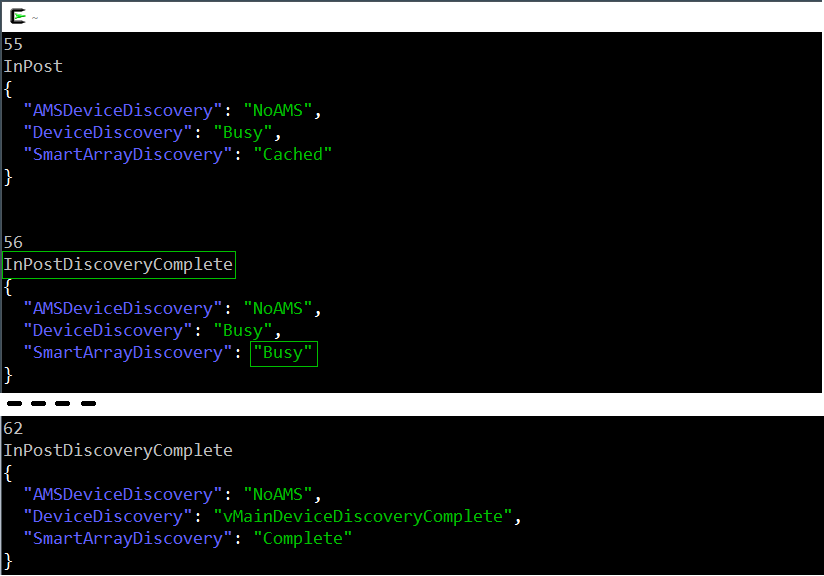
+The following picture shows three iterations of the the script during the start of a server. In iteration 55 the server is `InPost` while the SmartArray is in a `Cached` state meaning that it will answer queries with cached data.
+
+Two seconds later the next iteration returns the `InPostDiscoveryComplete` state and shows the SmartArray in `Busy` mode which means that it will return an error if queried during this state.
+
+In iteration 62 we are still in `InPostDiscoveryComplete` but both `DeviceDiscovery` and `SmartArrayDiscovery` have reached their final `Complete` state. Hence the the corresponding devices can be queried safely.
+
+
+
+
## Conclusion
Combining the `PowerState` Redfish property with specific HPE features like the `PostState` resource and the Agentless Management Service, you will be able to increase the efficiency of your monitoring and management applications.
</pre>
</div>Storage-Management-with-Redfish modified by François Donzé2018-10-30T17:25:38.851000Z2018-10-30T17:25:38.851000ZFrançois Donzéhttps://sourceforge.net/u/fdonze/https://sourceforge.net4878a1e0912cb44fdde2a5218550f4fb7261d86e<div class="markdown_content"><pre>--- v2
+++ v3
@@ -8,7 +8,7 @@
## Foreword
-The [Postman](https://www.getpostman.com/) API development environment is used to illustrate our examples. This should give you the ability to implement those atomic examples using your own preferred language.
+The [Postman](https://www.getpostman.com/) API development environment is used to illustrate our examples. This should give you the ability to implement those raw examples using your own preferred language.
The reader should have the knowledge of HTTP [request methods](https://en.wikipedia.org/wiki/Hypertext_Transfer_Protocol#Request_methods) like `GET`, `PUT` and `PATCH`.
@@ -16,7 +16,7 @@
## Storage information locations
-The Redfish® standard defines a `storage` subsystem as part of the `ComputerSystem` type under the `/redfish/v1/Systems/{item}/` location.
+The Redfish standard defines a `storage` subsystem as part of the `ComputerSystem` type under the `/redfish/v1/Systems/{item}/` location.
However, HPE implements the description and the configuration of its Smart Storage devices (i.e. SmartArray controllers) respectively in the `SmartStorage` and `SmartStorageConfig` sub-trees of the same `ComputerSystem` type.
</pre>
</div>Storage-Management-with-Redfish modified by François Donzé2018-10-30T17:03:47.481000Z2018-10-30T17:03:47.481000ZFrançois Donzéhttps://sourceforge.net/u/fdonze/https://sourceforge.net03b2100ca57114f08d4fab7a7da4edfdbe49f17c<div class="markdown_content"><pre>--- v1
+++ v2
@@ -2,7 +2,7 @@
## Introduction
-HPE Integrated Lights-Out 5 (iLO 5) in Gen10 servers introduced the management of storage controllers via its graphical user interface and via the [Redfish®](http://www.dmtf.org/redfish) RESTful API standard. Although [videos](https://www.youtube.com/channel/UCIZhrIYcNh3wHLiY4ola5ew/search?query=logicaldrive) already exist on that subject, we wanted to address this feature with a pure Redfish API approach, bypassing the `ilorest` [interface tool](http://www.hpe.com/info/resttool) and its Smart Array macro commands.
+HPE Integrated Lights-Out 5 (iLO 5) in Gen10 servers introduced the management of storage controllers via its graphical user interface and via the [Redfish](http://www.dmtf.org/redfish) RESTful API standard. Although [videos](https://www.youtube.com/channel/UCIZhrIYcNh3wHLiY4ola5ew/search?query=logicaldrive) already exist on that subject, we wanted to address this feature with a pure Redfish API approach, bypassing the `ilorest` [interface tool](http://www.hpe.com/info/resttool) and its Smart Array macro commands.
In this article we start by learning how to cleanup and prepare a Smart Storage Controller for receiving a configuration with one or more logical drives. Then on this fresh environment we will create a simple RAID array configuration prior to more complex ones to complement the [API reference documentation](https://hewlettpackard.github.io/ilo-rest-api-docs/ilo5/#smartstorage-configuration).
@@ -32,17 +32,17 @@
As described in a previous [blog](https://developer.hpe.com/blog/master-the-redfish-server-states-to-improve-your-monitoring-and-manageme), and to be sure the configuration process can happen smoothly, you should first verify that your managed systems are not at the `UEFI/System Utilities` level. Being in the `Off` state is a good state to start.
-Modification of Bios and storage controller configurations are performed in two stages as explained in the [Setting Bios and Storage Controller Properties with Redfish](https://developer.hpe.com/blog/setting-bios-and-storage-controller-properties-with-redfish) article. The first stage consists of setting the required parameters in a "pending zone" of the Redfish tree. Typically `/redfish/v1/Systems/{item}/SmartStorageConfig/Settings/`. During the next server reboot, parameters in the "pending zone", after validation, are transferred to the "running zone" at `/redfish/v1/Systems/{item}/SmartStorageConfig/`.
+Modification of Bios and storage controller configurations are performed in two stages as explained in the [Setting Bios and Storage Controller Properties with Redfish](https://developer.hpe.com/blog/setting-bios-and-storage-controller-properties-with-redfish) article. The first stage consists of setting the required parameters in the "pending settings area" of the Redfish data model (`/redfish/v1/Systems/{item}/SmartStorageConfig/Settings/`). During the next server reboot, parameters in the "pending settings area", after validation, are transferred to the "current configuration" at `/redfish/v1/Systems/{item}/SmartStorageConfig/`.
-Upon reboot and once the server has finished its Pre-OS Tasks (POST) you should check carefully whether the modifications have been taken into account in the running zone.
+Upon reboot and once the server has finished its Pre-OS Tasks (POST) you should check carefully whether the modifications have been accepted as the current configuration.
## The `DataGuard` property
The management of HPE Smart Storage devices requires a proper understanding of the `DataGuard` property part of the `SmartStorageConfig` sub-tree. The value of this key "_indicates whether or not data destructive actions are allowed_" as explained in the [API Reference documentation](https://hewlettpackard.github.io/ilo-rest-api-docs/ilo5/#dataguard).
-This property is set in the `SmartStorageConfig/Settings` pending zone along with the directives to be performed by the Smart Storage device (i.e. Logical Volume Creation, Deletion...). During the next POST, the firmware checks its value and performs or not the requested directives.
+This property is set in the pending settings (`SmartStoageConfig/Settings`) along with the directives to be performed by the Smart Storage device (i.e. Logical Volume Creation, Deletion...). During the next POST, the firmware checks its value and performs or not the requested directives.
-If the value is `Strict`, which is the default value when not set in the pending zone, the firmware denies any destructive data action (create/delete logical drives or clear drive metadata....).
+If the value is `Strict`, which is the default value when not changed in the pending settings, the firmware denies any destructive data action (create/delete logical drives or clear drive metadata....).
If the value is set to `Disabled`, destructive data actions are allowed. Finally when the value is `Permissive`, only destructive data actions are allowed on the specified objects.
@@ -64,7 +64,7 @@
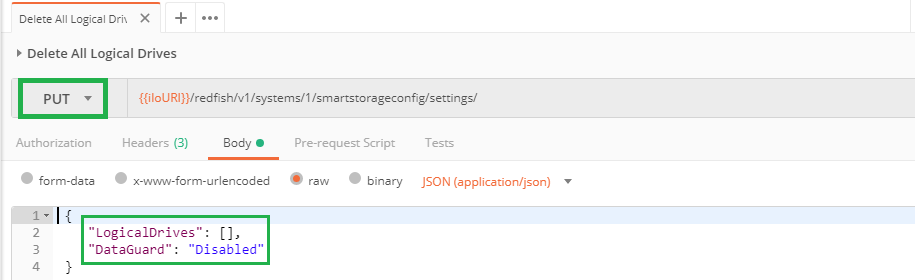
Since this action is data destructive we must disable the `DataGuard` property to make sure the firmware allows this operation during the next reboot/POST of the system.
-The next screenshot contains all the necessary information to complete this remove operation: Body of the HTTP `PUT` toward the `SmartStorageConfig/Settings/` pending zone:
+The next screenshot contains all the necessary information to complete this remove operation: Perform an HTTP `PUT` to the pending settings (`SmartStorageConfig/Settings/`):
@@ -74,7 +74,7 @@
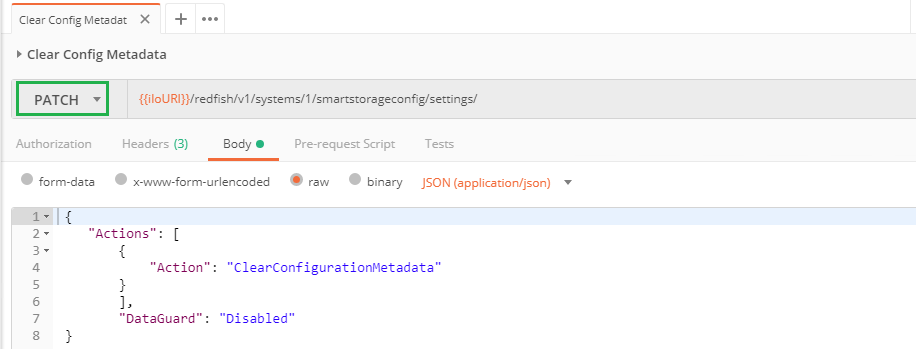
-If you want to perform a single request removing all the logical drives and clearing the metadata, you have to perform a `PUT` toward the pending configuration zone with the following body:
+If you want to perform a single request removing all the logical drives and clearing the metadata, you have to perform a `PUT` of the pending settings with the following body:
````json
{
@@ -91,7 +91,7 @@
### Removing a single/specific logical drive
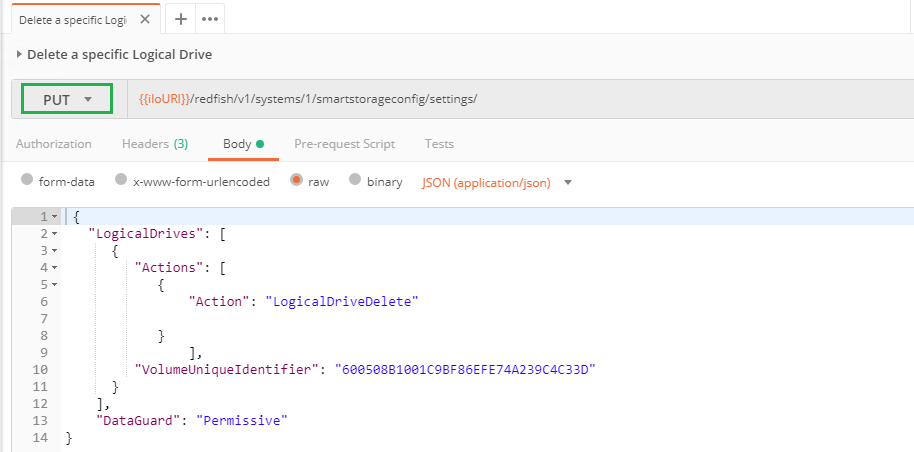
-To delete a specific logical drive you have to send a `PUT` action request to the `SmartStorageConfig/settings` pending zone. This request must contain the unique identifier of the desired logical drive as well as the `DataGuard` property set to `Permissive` to avoid the removal of other logical drives, if any:
+To delete a specific logical drive you have to send a `PUT` request to the `SmartStorageConfig/settings` (pending settings). This request must contain the unique identifier of the desired logical drive as well as the `DataGuard` property set to `Permissive` to avoid the removal of other logical drives, if any:
@@ -133,16 +133,16 @@
### First logical drive creation
-In this clean context, we just need to send a `PUT` request to the `SmartStorageConfig/settings` pending zone with the properties of the desired logical drive as an element of the `LogicalDrives` array and the `DataGuard` value set to `Disabled`.
+In this clean context, we just need to send a `PUT` request to the `SmartStorageConfig/settings` (pending settings) with the properties of the desired logical drive as an element of the `LogicalDrives` array and the `DataGuard` value set to `Disabled`.
The following picture shows the entire body of the `PUT` request with the mandatory properties in green boxes: `DataGuard`, `DataDrives` list, `Raid` type, `SpareDrives` list and `SpareRebuildMode`. Other properties will be defaulted if not supplied.
A `200` return status with a `SystemResetRequired` "Error"
-message indicates that the remote SmartArray pending zone has been populated.
+message indicates that the remote SmartArray pending settings has been changed.
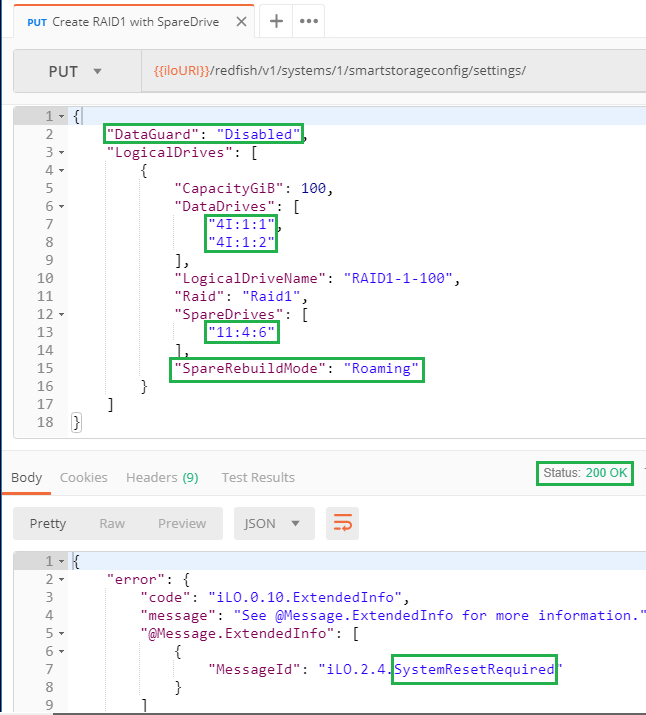
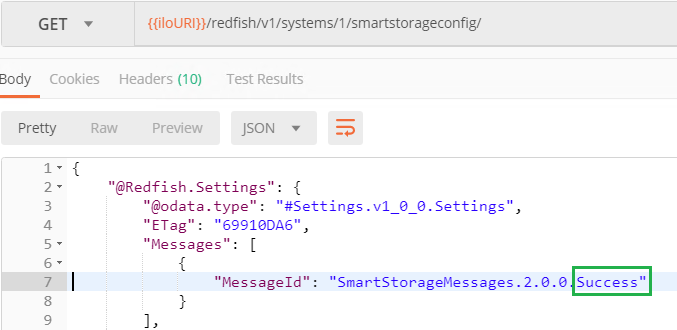
-Upon reboot of the server it is mandatory to verify that the running zone contains only the `Success` message. This ensures that the configuration happened effectively.
+Upon reboot of the server you should verify that the current configuration contains only the `Success` message. This ensures that the configuration happened effectively.
@@ -150,15 +150,15 @@
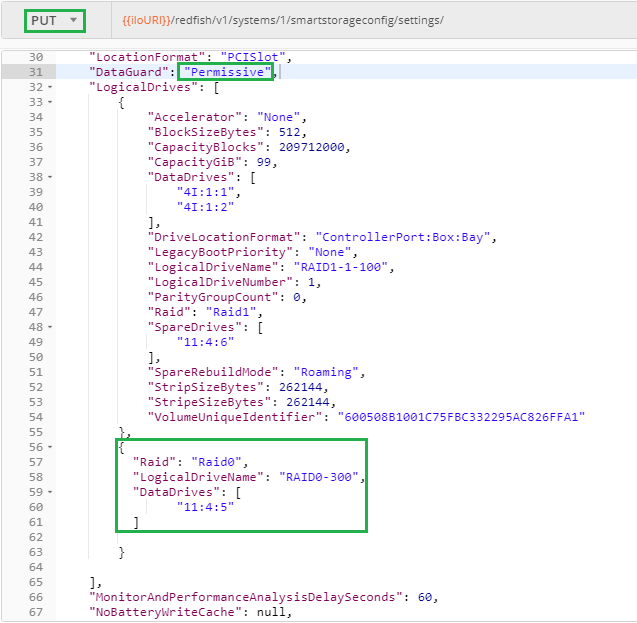
In this paragraph we want to add a logical drive without altering the existing configuration. This operation could be noted "`=+`" in high level programming languages and we will use this analogy to build the body of the corresponding `PUT` request.
-The "`=`" portion of this process is performed by copying the entire `SmartStorageConfig` running zone into the body of a `PUT` request. The remote iLO Redfish server is smart enough to keep only needed properties.
+The "`=`" portion of this process is performed by copying the entire `SmartStorageConfig` current configuration into the body of a `PUT` request. The remote iLO Redfish server is smart enough to keep only needed properties.
The "`+`" part consists of adding the desired logical drive into the `LogicalDrives` array and changing the `DataGuard` value.
-The body of this `PUT` request is now ready to be sent to the `SmartStorageConfig/settings` pending zone of the managed iLO.
+The body of this `PUT` request is now ready to be sent to the `SmartStorageConfig/settings` (pending settings) of the managed iLO.
-Again and again, you must check the return status, reboot if it is `Ok` and verify that the running zone contains only a single `Success` message to be sure that your modification is there.
+Again and again, you must check the return status, reboot if it is `Ok` and verify that the current configuration contains only a single `Success` message to be sure that your modification is there.
### Adding a logical drive in an existing disk array
@@ -170,10 +170,10 @@
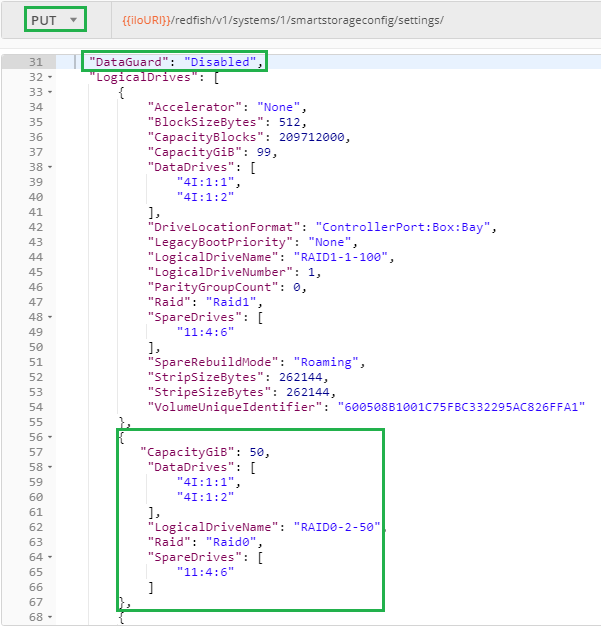
-After reboot, the requested RAID0 logical drive is visible in the running zone. Note that the `SpareRebuildMode` has been automatically adjusted to [`Dedicated`](https://hewlettpackard.github.io/ilo-rest-api-docs/ilo5/#sparerebuildmode) since `Roaming` is not a valid value anymore.
+After reboot, the requested RAID0 logical drive is visible in the current configuration. Note that the `SpareRebuildMode` has been automatically adjusted to [`Dedicated`](https://hewlettpackard.github.io/ilo-rest-api-docs/ilo5/#sparerebuildmode) since `Roaming` is not a valid value anymore.
-
+
## Conclusion
-With the ability of managing HPE Smart Storage with Redfish we now have the full control of Gen10 servers with a single RESTful API.
+The ability of managing HPE Smart Storage with Redfish is a major step forward to the full control of Gen10 servers with a single RESTful API.
</pre>
</div>Redfish wiki Home modified by François Donzé2018-10-30T17:02:06.216000Z2018-10-30T17:02:06.216000ZFrançois Donzéhttps://sourceforge.net/u/fdonze/https://sourceforge.netea51a71a75ffb2bd26181c25344dc6d714ba7236<div class="markdown_content"><pre>--- v33
+++ v34
@@ -15,6 +15,7 @@
Modifications of Bios and Storage Controoler Properties require a system reset. This article explains in details this process when using the Redfish RESTful API on HPE ProLiant servers and Synergy compute modules.
.
* [Storage-Management-with-Redfish]
+In this article we start by learning how to cleanup and prepare a Smart Storage Controller for receiving a configuration with one or more logical drives. Then on this fresh environment we will create a simple RAID array configuration prior to more complex ones to complement the [API reference documentation](https://hewlettpackard.github.io/ilo-rest-api-docs/ilo5/#smartstorage-configuration).
.
* [Getting-started-with-the-Redfish-API-Part2]
This post is the logical continuation of the the [Getting Started with the iLO 4 Redfish API](https://developer.hpe.com/blog/getting-started-with-the-redfish-api-part-2). It discusses best practices to implement since the launch of iLO 5 present in HPE ProLiant Gen10 servers.
</pre>
</div>Storage-Management-with-Redfish modified by François Donzé2018-10-29T12:58:37.815000Z2018-10-29T12:58:37.815000ZFrançois Donzéhttps://sourceforge.net/u/fdonze/https://sourceforge.net17077c77f2c926fdce4e31ad495c28ad0473b7a9<div class="markdown_content"><h1 id="storage-management-with-redfishwzxhzdk2">Storage management with Redfish®</h1>
<h2 id="introduction">Introduction</h2>
<p>HPE Integrated Lights-Out 5 (iLO 5) in Gen10 servers introduced the management of storage controllers via its graphical user interface and via the <a class="" href="http://www.dmtf.org/redfish" rel="nofollow">Redfish®</a> RESTful API standard. Although <a class="" href="https://www.youtube.com/channel/UCIZhrIYcNh3wHLiY4ola5ew/search?query=logicaldrive" rel="nofollow">videos</a> already exist on that subject, we wanted to address this feature with a pure Redfish API approach, bypassing the <code>ilorest</code> <a class="" href="http://www.hpe.com/info/resttool" rel="nofollow">interface tool</a> and its Smart Array macro commands.</p>
<p>In this article we start by learning how to cleanup and prepare a Smart Storage Controller for receiving a configuration with one or more logical drives. Then on this fresh environment we will create a simple RAID array configuration prior to more complex ones to complement the <a class="" href="https://hewlettpackard.github.io/ilo-rest-api-docs/ilo5/#smartstorage-configuration" rel="nofollow">API reference documentation</a>.</p>
<h2 id="foreword">Foreword</h2>
<p>The <a class="" href="https://www.getpostman.com/" rel="nofollow">Postman</a> API development environment is used to illustrate our examples. This should give you the ability to implement those atomic examples using your own preferred language.</p>
<p>The reader should have the knowledge of HTTP <a class="" href="https://en.wikipedia.org/wiki/Hypertext_Transfer_Protocol#Request_methods" rel="nofollow">request methods</a> like <code>GET</code>, <code>PUT</code> and <code>PATCH</code>.</p>
<p>Moreover, it is assumed that the reader knows how to manage Redfish sessions as described in the <a class="" href="https://hewlettpackard.github.io/ilo-rest-api-docs/ilo5/#authentication-and-sessions" rel="nofollow">Redfish API Reference documentation</a> as well as in this <a class="" href="https://developer.hpe.com/blog/managing-ilo-sessions-with-redfish" rel="nofollow">article</a>.</p>
<h2 id="storage-information-locations">Storage information locations</h2>
<p>The Redfish® standard defines a <code>storage</code> subsystem as part of the <code>ComputerSystem</code> type under the <code>/redfish/v1/Systems/{item}/</code> location.</p>
<p>However, HPE implements the description and the configuration of its Smart Storage devices (i.e. SmartArray controllers) respectively in the <code>SmartStorage</code> and <code>SmartStorageConfig</code> sub-trees of the same <code>ComputerSystem</code> type.</p>
<p>Since our infrastructure contains only HPE storage devices, only the <code>SmartStorage*</code> locations are populated. The following picture shows the URIs of four disk drives in our infrastructure. Their properties can be obtained with a simple <code>GET</code> request. </p>
<p><img alt="Physical Drives seen from the SmartStorage location" rel="nofollow" src="https://redfish-lab.sourceforge.io/media/redfish-wiki/StorageManagementWithRedfifsh/1-PhysicalDrives.png"/></p>
<p>If you only need the physical location of the disks to use for your logical drives, you can <code>GET</code> them from the <code>SmartStorageConfig</code> location as shown below.</p>
<p><img alt="Physical Drives seen from the SmartStorageConfig location" rel="nofollow" src="https://redfish-lab.sourceforge.io/media/redfish-wiki/StorageManagementWithRedfifsh/2-PhysicalDrives.png"/></p>
<h2 id="storage-controller-configuration-process">Storage controller configuration process</h2>
<p>As described in a previous <a class="" href="https://developer.hpe.com/blog/master-the-redfish-server-states-to-improve-your-monitoring-and-manageme" rel="nofollow">blog</a>, and to be sure the configuration process can happen smoothly, you should first verify that your managed systems are not at the <code>UEFI/System Utilities</code> level. Being in the <code>Off</code> state is a good state to start.</p>
<p>Modification of Bios and storage controller configurations are performed in two stages as explained in the <a class="" href="https://developer.hpe.com/blog/setting-bios-and-storage-controller-properties-with-redfish" rel="nofollow">Setting Bios and Storage Controller Properties with Redfish</a> article. The first stage consists of setting the required parameters in a "pending zone" of the Redfish tree. Typically <code>/redfish/v1/Systems/{item}/SmartStorageConfig/Settings/</code>. During the next server reboot, parameters in the "pending zone", after validation, are transferred to the "running zone" at <code>/redfish/v1/Systems/{item}/SmartStorageConfig/</code>.</p>
<p>Upon reboot and once the server has finished its Pre-OS Tasks (POST) you should check carefully whether the modifications have been taken into account in the running zone.</p>
<h2 id="the-dataguard-property">The <code>DataGuard</code> property</h2>
<p>The management of HPE Smart Storage devices requires a proper understanding of the <code>DataGuard</code> property part of the <code>SmartStorageConfig</code> sub-tree. The value of this key "<em>indicates whether or not data destructive actions are allowed</em>" as explained in the <a class="" href="https://hewlettpackard.github.io/ilo-rest-api-docs/ilo5/#dataguard" rel="nofollow">API Reference documentation</a>.</p>
<p>This property is set in the <code>SmartStorageConfig/Settings</code> pending zone along with the directives to be performed by the Smart Storage device (i.e. Logical Volume Creation, Deletion...). During the next POST, the firmware checks its value and performs or not the requested directives.</p>
<p>If the value is <code>Strict</code>, which is the default value when not set in the pending zone, the firmware denies any destructive data action (create/delete logical drives or clear drive metadata....).</p>
<p>If the value is set to <code>Disabled</code>, destructive data actions are allowed. Finally when the value is <code>Permissive</code>, only destructive data actions are allowed on the specified objects.</p>
<p>Refer to the <a class="" href="https://hewlettpackard.github.io/ilo-rest-api-docs/ilo5/#delete-logical-drives" rel="nofollow">documentation</a> for more information.</p>
<h2 id="storage-controller-and-physical-disks-preparation">Storage controller and physical disks preparation</h2>
<p>Imagine we just received a bunch of brand new servers or we want to re-deploy servers for a new project. In this context, we would like to remove completely the entire storage configuration as well as all meta data stored in the physical drives to get a clean Smart Storage subsystem.</p>
<p>Redfish models logical drives as a JSON collection stored in an array of objects represented like: <code>"LogicalDrives": [{ld-1},{ld-2,...{ld-n}]</code>. Each <code>ld-i</code> of this array contains the necessary properties to describe precisely the corresponding logical drive.</p>
<p>The following screenshot shows the <code>LogicalDrives</code> array containing one element and its attributes. We learn that this logical drive is a RAID 0 made of a single data drive (<code>1I:3:1</code>).</p>
<p><img alt="Logical drive collection" rel="nofollow" src="https://redfish-lab.sourceforge.io/media/redfish-wiki/StorageManagementWithRedfifsh/3-LogicalDriveCollection.png"/></p>
<h3 id="removing-all-logical-drives">Removing all logical drives</h3>
<p>Removing all the logical drives of a Smart Storage Controller is equivalent to the removal of all the elements of the <code>LogicalDrives</code> array. Practically we need to request an empty array to the Redfish server.</p>
<p>Since this action is data destructive we must disable the <code>DataGuard</code> property to make sure the firmware allows this operation during the next reboot/POST of the system.</p>
<p>The next screenshot contains all the necessary information to complete this remove operation: Body of the HTTP <code>PUT</code> toward the <code>SmartStorageConfig/Settings/</code> pending zone:</p>
<p><img alt="Deleting all HPE Logical drives" rel="nofollow" src="https://redfish-lab.sourceforge.io/media/redfish-wiki/StorageManagementWithRedfifsh/3-DeleteAllLogicalDrives.png"/></p>
<h3 id="clearing-disk-drives-configuration-metadata">Clearing disk drives configuration metadata</h3>
<p>HPE Smart Array RAID uses a reserved area at the end of each physical drive to store information about the logical drive configuration they are part of. When the <a class="" href="https://www.hpe.com/us/en/product-catalog/detail/pip.5409020.html" rel="nofollow">Smart Storage Administrator (SSA)</a> application or Redfish is used to delete a logical drive, the metadata is cleaned up. However, if drives are moved around, there may be leftover metadata on the drives. The controller may show a failed logical drive or keep the drive from being presented to the OS. The <code>ClearConfigurationMetadata</code> action with the <code>DataGuard</code> property disabled using the <code>PATCH</code> method can be used to remedy this problem.</p>
<p><img alt="Clear disk drives configuration metadata" rel="nofollow" src="https://redfish-lab.sourceforge.io/media/redfish-wiki/StorageManagementWithRedfifsh/4-ClearConfigMetadata.png"/></p>
<p>If you want to perform a single request removing all the logical drives and clearing the metadata, you have to perform a <code>PUT</code> toward the pending configuration zone with the following body:</p>
<div class="codehilite"><pre><span></span><span class="p">{</span>
<span class="nt">"Actions"</span><span class="p">:</span> <span class="p">[</span>
<span class="p">{</span>
<span class="nt">"Action"</span><span class="p">:</span> <span class="s2">"ClearConfigurationMetadata"</span>
<span class="p">}</span>
<span class="p">],</span>
<span class="nt">"LogicalDrives"</span><span class="p">:</span> <span class="p">[],</span>
<span class="nt">"DataGuard"</span><span class="p">:</span> <span class="s2">"Disabled"</span>
<span class="p">}</span>
</pre></div>
<h3 id="removing-a-singlespecific-logical-drive">Removing a single/specific logical drive</h3>
<p>To delete a specific logical drive you have to send a <code>PUT</code> action request to the <code>SmartStorageConfig/settings</code> pending zone. This request must contain the unique identifier of the desired logical drive as well as the <code>DataGuard</code> property set to <code>Permissive</code> to avoid the removal of other logical drives, if any:</p>
<p><img alt="Specific logical drive deletion" rel="nofollow" src="https://redfish-lab.sourceforge.io/media/redfish-wiki/StorageManagementWithRedfifsh/7-DeleteSpecificLogicalDrive.png"/></p>
<h3 id="sanitizing-disk-drives">Sanitizing / disk drives</h3>
<p>In addition to the removal of logical drives and the meta data cleanup of physical drives you may want to <a class="" href="https://hewlettpackard.github.io/ilo-rest-api-docs/ilo5/#sanitize-drives" rel="nofollow">erase / sanitize</a> a list of physical drives. To perform this (long) operation, send the following <code>PATCH</code> action with the correct list of the drives to erase separated by a comma. Don't forget to disabled the <code>DataGuard</code> property as well:</p>
<p><img alt="Sanitize physical disk drives" rel="nofollow" src="https://redfish-lab.sourceforge.io/media/redfish-wiki/StorageManagementWithRedfifsh/5-SanitizePhysicalDrive.png"/></p>
<p>The <code>ErasePattern</code> property supports the following <a class="" href="https://hewlettpackard.github.io/ilo-rest-api-docs/ilo5/#actions-array" rel="nofollow">values</a>:</p>
<div class="codehilite"><pre><span></span> SanitizeRestrictedBlockErase
SanitizeUnrestrictedBlockErase
SanitizeRestrictedOverwrite
SanitizeUnrestrictedOverwrite
SanitizeRestrictedCryptoScramble
SanitizeUnrestrictedCryptoScramble
OnePass
TwoPass
ThreePass
</pre></div>
<p>As mentioned above, the sanitize process is extremely long and you can retrieve the erase status in the disk drive properties under the <code>SmartStorage</code> sub-tree:</p>
<p><img alt="Sanitize / Erase status" rel="nofollow" src="https://redfish-lab.sourceforge.io/media/redfish-wiki/StorageManagementWithRedfifsh/6-EraseStatus.png"/></p>
<h2 id="logical-drive-creation">Logical drive creation</h2>
<p>Logical drives can be created using the <code>PUT</code> method. In some circumstances a <code>PATCH</code> can be used but, to keep things simple, we'll only use the <code>PUT</code> method.</p>
<p>In this section we will start with the clean infrastructure generated previously to create a 100GB RAID1 logical drive with a <a class="" href="https://hewlettpackard.github.io/ilo-rest-api-docs/ilo5/#sparerebuildmode" rel="nofollow"><code>Roaming</code></a> spare drive.</p>
<p>Then we will add a RAID0 Logical drive located on a single hard disk without spare drive and spanning the entire disk (300GB).</p>
<p>Finally we will add a second logical drive of 50 GB in the RAID1 array created earlier.</p>
<p>This scenario may not be completely realistic; however our goal is to more didactic than realistic.</p>
<h3 id="first-logical-drive-creation">First logical drive creation</h3>
<p>In this clean context, we just need to send a <code>PUT</code> request to the <code>SmartStorageConfig/settings</code> pending zone with the properties of the desired logical drive as an element of the <code>LogicalDrives</code> array and the <code>DataGuard</code> value set to <code>Disabled</code>.</p>
<p>The following picture shows the entire body of the <code>PUT</code> request with the mandatory properties in green boxes: <code>DataGuard</code>, <code>DataDrives</code> list, <code>Raid</code> type, <code>SpareDrives</code> list and <code>SpareRebuildMode</code>. Other properties will be defaulted if not supplied.</p>
<p>A <code>200</code> return status with a <code>SystemResetRequired</code> "Error"<br/>
message indicates that the remote SmartArray pending zone has been populated.</p>
<p><img alt="RAID1 with Spare drive creation" rel="nofollow" src="https://redfish-lab.sourceforge.io/media/redfish-wiki/StorageManagementWithRedfifsh/8-Logical-RAID1Spare-Creation.png"/></p>
<p>Upon reboot of the server it is mandatory to verify that the running zone contains only the <code>Success</code> message. This ensures that the configuration happened effectively.</p>
<p><img alt="Successful Logical Drive creation" rel="nofollow" src="https://redfish-lab.sourceforge.io/media/redfish-wiki/StorageManagementWithRedfifsh/9-RunningZoneAfterCreation.png"/></p>
<h3 id="creating-more-logical-drives">Creating more logical drives</h3>
<p>In this paragraph we want to add a logical drive without altering the existing configuration. This operation could be noted "<code>=+</code>" in high level programming languages and we will use this analogy to build the body of the corresponding <code>PUT</code> request.</p>
<p>The "<code>=</code>" portion of this process is performed by copying the entire <code>SmartStorageConfig</code> running zone into the body of a <code>PUT</code> request. The remote iLO Redfish server is smart enough to keep only needed properties.</p>
<p>The "<code>+</code>" part consists of adding the desired logical drive into the <code>LogicalDrives</code> array and changing the <code>DataGuard</code> value.</p>
<p>The body of this <code>PUT</code> request is now ready to be sent to the <code>SmartStorageConfig/settings</code> pending zone of the managed iLO.</p>
<p><img alt="Add a logical drive in a separate array" rel="nofollow" src="https://redfish-lab.sourceforge.io/media/redfish-wiki/StorageManagementWithRedfifsh/11-AddLogicalDrive.png"/></p>
<p>Again and again, you must check the return status, reboot if it is <code>Ok</code> and verify that the running zone contains only a single <code>Success</code> message to be sure that your modification is there.</p>
<h3 id="adding-a-logical-drive-in-an-existing-disk-array">Adding a logical drive in an existing disk array</h3>
<p>The last exercise consists of adding a RAID0 logical drive of 50GB in the first storage array we created earlier. This array has a capacity of 300GB and we are only consuming 100GB with logical drive <code>RAID1-1-100</code>.</p>
<p>Similarly to the previous paragraph we have to perform a "<code>=+</code>" operation including the modification of the <code>DataGuard</code> property and the addition logical drive .</p>
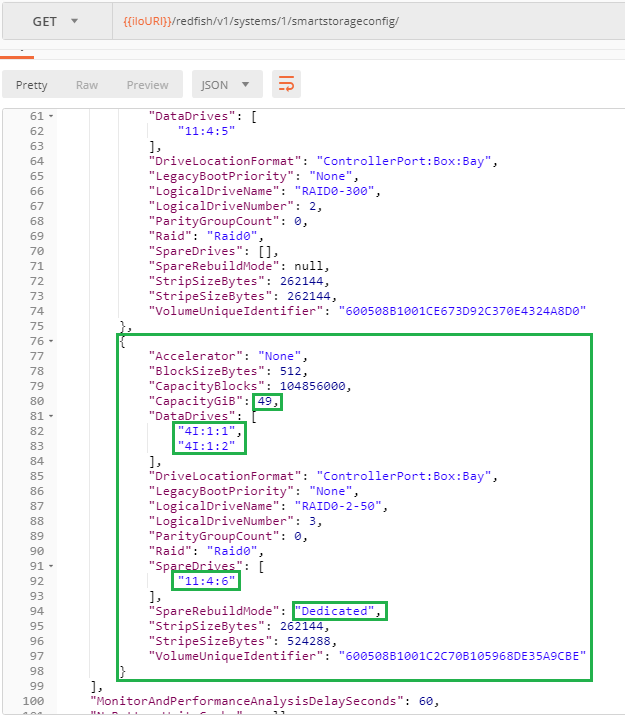
<p>The following screenshot shows the characteristics of the added RAID0 logical drive mentioning its size as well as the <code>DataDrives</code> and the spare drive used in the storage array created for the RAID1 logical drive in our first example. This ensures the creation of the desired logical drive in the right place.</p>
<p><img alt="Adding a logical drive in an existing array" rel="nofollow" src="https://redfish-lab.sourceforge.io/media/redfish-wiki/StorageManagementWithRedfifsh/12-AddLogicalDriveToExistingArray.png"/></p>
<p>After reboot, the requested RAID0 logical drive is visible in the running zone. Note that the <code>SpareRebuildMode</code> has been automatically adjusted to <a class="" href="https://hewlettpackard.github.io/ilo-rest-api-docs/ilo5/#sparerebuildmode" rel="nofollow"><code>Dedicated</code></a> since <code>Roaming</code> is not a valid value anymore.</p>
<p><img alt="Running zone after the addition of logical drive in an existing array" rel="nofollow" src="https://redfish-lab.sourceforge.io/media/redfish-wiki/StorageManagementWithRedfifsh/13-RunningZoneAfterAddition.png"/></p>
<h2 id="conclusion">Conclusion</h2>
<p>With the ability of managing HPE Smart Storage with Redfish we now have the full control of Gen10 servers with a single RESTful API.</p></div>Redfish wiki Home modified by François Donzé2018-10-28T16:06:29.556000Z2018-10-28T16:06:29.556000ZFrançois Donzéhttps://sourceforge.net/u/fdonze/https://sourceforge.netf30de954f37e1be2bbe6b8310756ed1cc0bbb888<div class="markdown_content"><pre>--- v32
+++ v33
@@ -14,7 +14,8 @@
* [Setting-Bios-and-StorageControllerProperties-with-Redfish]
Modifications of Bios and Storage Controoler Properties require a system reset. This article explains in details this process when using the Redfish RESTful API on HPE ProLiant servers and Synergy compute modules.
.
-
+* [Storage-Management-with-Redfish]
+.
* [Getting-started-with-the-Redfish-API-Part2]
This post is the logical continuation of the the [Getting Started with the iLO 4 Redfish API](https://developer.hpe.com/blog/getting-started-with-the-redfish-api-part-2). It discusses best practices to implement since the launch of iLO 5 present in HPE ProLiant Gen10 servers.
.
</pre>
</div>